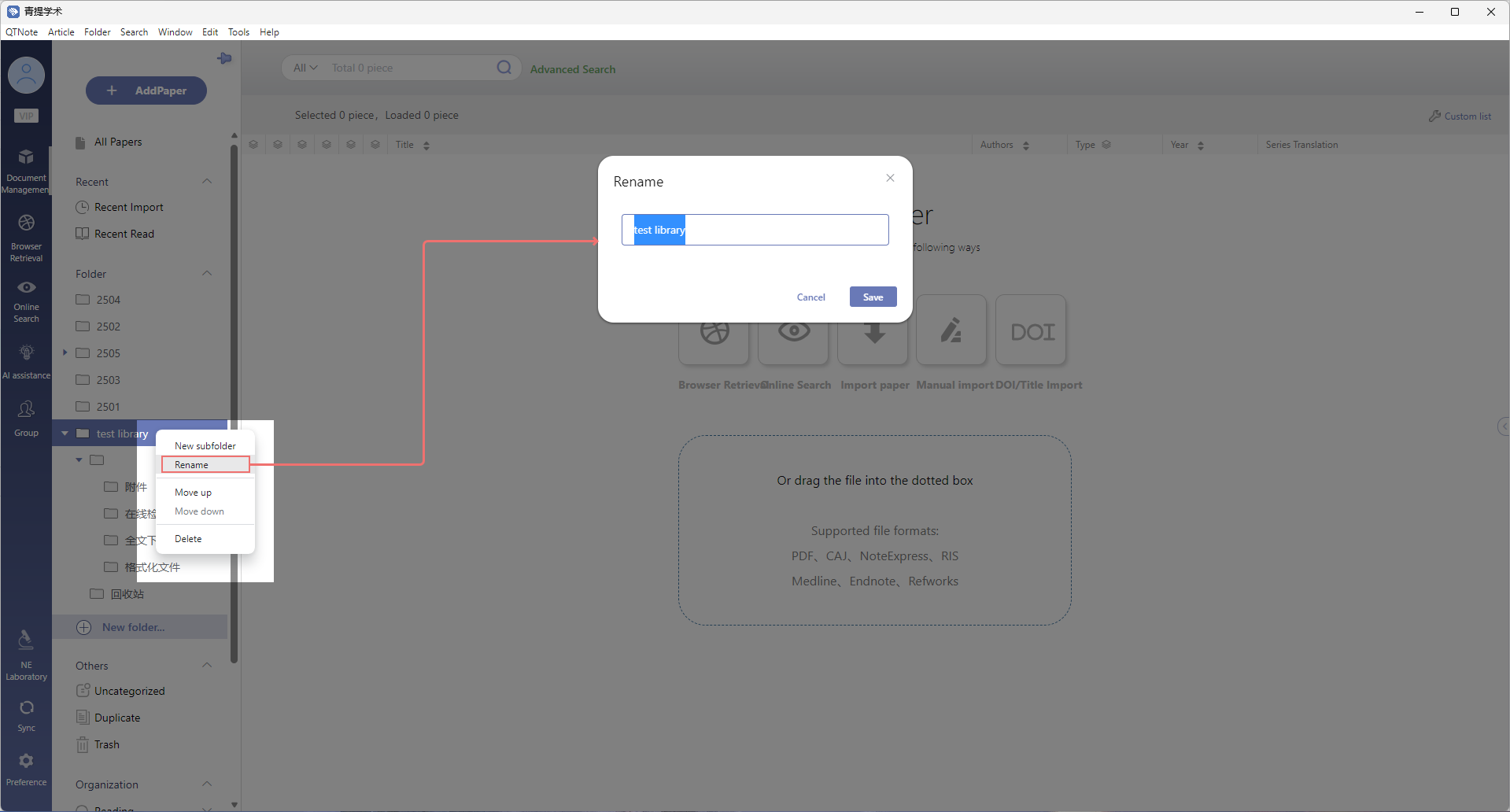
目录 搜索 Introduction to NoteExpress WebDownload and InstallationUser Benefits and Acquisition MethodsRegistration and LoginUsing CARSI CertificationUsing the "Institutional Code"Reference Addition and CollectionFile ImportImport of PDF and CAJ FilesManual Completion of Article InformationImport from Other SoftwareImport of Formatted FilesManual AdditionIdentifier/Title ImportDiscoveryOnline SearchAdvanced SearchAI Enhanced SearchBrowser RetrievalSubscriptionsReference ManagementFolder StructureAll ReferencesRecentFolder ManagementNew FolderVirtual FolderRename FolderDelete FolderUncategorizedDuplicateTrashOrganizationCustom TagsList ViewLocal SearchData SynchronizationData MigrationReference InformationReference OverviewReference DetailsReference NotesAttachmentsAdd AttachmentsAutomatic Full-text DownloadManual Full-text DownloadMore Data SourcesAttachment ReadingAdd NotesTranslation SettingsSidebar TranslationFull Text TranslationTerminology Database ManagementChart ExtractionRead AssistantPodcast ListeningToolsCSL Writing PluginInstallation Guide - WindowsInstallation Guide - macOSInstallation Guide - HarmonyOSAuthorized LoginWriting StepsReference Style ManagementWriting PluginAI AssistanceWriting_AssistancePolishingRewritingDuplication ReductionContinuation WritingOutliningManuscript ReviewDeep ResearchMulti-Paper ReadingPDF ToolkitNoteExpress Web MCPNoteExpress Web HarnessGroupsCreate a GroupAdd References to a GroupInvite Members to a GroupReading and Collaboration in GroupsCustom Development CenterWhiteboardWebDAV Attachment SyncTechnical SupportSettingsMobile GuideMobile DownloadMobile Registration and LoginMobile Data Sync, View, Read and BroadcastWebDAV Configuration (Mobile)Mobile Data ManagementMobile Data Addition 暂无相关搜索结果! 本文档使用 MinDoc 发布 Rename Folder a. Select the target folder, right-click and choose Renameb. Enter new folder name, then click Save to save 文档更新时间: 2026-06-04 19:04 作者:管理员
a. Select the target folder, right-click and choose Renameb. Enter new folder name, then click Save to save 文档更新时间: 2026-06-04 19:04 作者:管理员